Posts

Please help me make a list of note taking apps with phone & web and/or PC/Mac clients?

Image
Regular readers know I use and write about Evernote and Keep. In fact, I am enchanted  with all notetaking apps. I'm constantly adding them to my phone to play with for a bit. In my mind,there are three tiers of notetaking apps Tier 1 : smart phone apps for iphone and/or Android coupled with both a web app and a client for PC and/or Mac Tier 2 : smart phone apps for iphone and/or Android with a web app Tier 3 : smart phone apps only  The apps store list the Tier 3 apps. And if you explore each one, you can determine which are really tier 2 or 1 apps. My question to you then, is do you know of  tier 1 or 2 note taking app I am not yet aware? I know about : Dropbox  Paper  Evernote  Keep  OneNote  Trello  Simplenote  Audionote  Also Zoho Notebook because apparently a web app is coming soon Which ones am I missing? You can comment here, or use this Google Form  to tell me. Once I have a go...

Do you use your cell phone for business? You need a filter between your business & personal communications.

Image
If you use your cell phone for business calls, you will want to set up a “filter” between your phone and your business contacts i.e. clients, customers, co-workers, supervisors. Google Voice is that filter.   How does Google Voice work? You receive a unique telephone number.  When someone calls that number, it seamlessly forwards to your cell phone.  When you place a call, your Google Voice number shows up on caller ID. Likewise, when someone sends a text to your GV number, it shows up on your phone. And when you text, it shows up as having come from your GV number. And the best thing:  it is free . What does Google Voice do? As mentioned above,when someone dials your GV number, it can ring your cell phone. It can also ring your landline too, if you have one. If your phone is lost or damaged, you can borrow someone else’s phone, or buy a cheap pay-as-you go phone and simply tell GV to forward calls to that phone until  you find or replace...

My Pixel started playing the Morning Briefing podcasts at 50% speed

Image
Every morning I wish my phone good morning.  Well, sort of.  After my shower, as I dress, I say "OK Google, good morning." It then wishes me a good day, tells me the time, temperature, weather forecast and information about my commute.  It then plays the BBS Minute newscast, and an NPR news summary. A couple months ago, the BBC came up very slow speaking. I thought it was just a case of wacky Brits. Maybe there wasn't enough news copy for a minute so they were being silly. Then NPR's came up, also slow. This has persisted through two monthly security updates and multiple restarts of the phone.  So today I'm putting in feedback to Google Assistant, and wanted this blog post to point at with more details then they might want in a feedback. I know it is 50% because this morning I recorded to Audiology on my PC the full two minutes of the BBC Minute playing through Google Assistant, and then again through Pocket Casts.  And yes, Pocket Casts is set to n...

We wouldn't let our Fedex driver get away with it...

Imagine you order a critical drug from an online pharmacy.  Overnight shipping is free because it it built into the price.  And your local pharmacy can't get your specialized drug to you sooner. The next day comes a knock on your door.  It is your Fedex driver.  He says he has your package on his truck.  "Great!", you say, "bring it in." He then asks for $25.  "But the shipping is already paid for!" you protest using bad grammar. "Yes," he explains, "you paid your online pharmacy and they paid Fedex, but I feel entitled to a bonus for giving it to you.  You can pay me $25 and get it tomorrow, or I'll bring it to you for no extra cost, but in five days." Or worse, he tells you he has a private deal with a competitor of your online pharmacy and if you order from them he'll bring you the order as soon as he gets it. That's Net Neutrality in a nutshell. When we go to a website, we expect that website to come up o...

Evernote Search

Image
Evernote revisited a topic recently all Evernote users should periodically review :  the  Evernote Search Syntax . If you don't know about how to search Evernote using their powerful grammar, take a few minutes to read the post and play a bit with what you have learned. It will increase the value you get from Evernote.  I'm a big advocate of  putting almost everything  in Evernote, but the value of the tool is getting back the notes you need.  The tips in their blog post will help you do that. The full search grammar for Evernote is  documented in their Developers pages . I remember how thrilled I was to discover the predecessor to that page.  I  wrote about it  starting back in 2009.

Scripting Evernote in Windows (an updated look)

Image
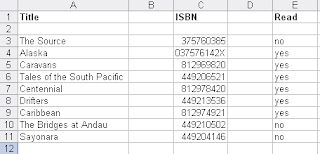
Below is a re-post of an entry from August 1, 2009.  My first ever re-post, but in my defense, still relevant. And I've updated it slightly. I am working on another project using Autoit and Evernote's Windows scripting engine, ENSCRIPT so have been looking at this script again, and fixing some broken links. So, onto the old post ... Evernote is one of those applications with a lot more power then is immediately evident. For example, Podcast #9   (June 2017 note - no longer available) debuted yesterday, and they talk about Saved Searches. As part of that, they talk about their rich search vocabulary and how they have hidden that ability in the API documentation . Another wonderful ability not obvious until you search around on their website, is Evernote's scripting capabilities. They have one for Windows they built called ENScript   ( June 2017 note: link updated)  , and another for the Macintosh   (June 2017 note: link updated) . Of course,...

Why I use Autoit 3 for many of my projects

Image
My next post appearing in a couple of minutes is a programming project I first did in 2009 about using Excel to create notes in Evernote. I wrote the tool in a scripting language called AutoIt .  Autoit is not generally thought of as a tool for developing applications.  I started to explain in the post why I chose Autoit, but the explanation was getting lengthy, so I decided to have just a brief statement in that post, and then link to a longer explanation. This post is that longer explanation, and also a recommendation of Autoit for certain users and tasks. Let's take a look at what is Autoit and why I chose it. Look for a future, far more ambitious project being done in Autoit coming in several weeks (to a couple months--you know programming projects!)