Posts

Showing posts with the label Evernote's enscript

Notes Folder : My new note taking system

Image
I'm in the process of moving to a new way to keep my notes. It would be best to make a separate post on my long time notetaking app, Evernote, and how it now disappoints me.  Bottom line, I no longer trust the company behind Evernote since it was acquired. My first inclination was to finally look at alternatives. like Notion, Joplin, Obsidian, etc. I was not enamored with any of them, so I gritted my teeth and stayed with Evernote. The situation made me think about how I use Evernote. To keep up additional posts on this topic, search on the tag Notes Folder Updates : January 24, 2024 and in updates noted here. Most of the things I store are quick notes, lists, online receipts for online bills, that sort of thing; kind of an online file cabinet if you will. If I were a doctoral student though I could see storing PDFs of papers and research materials.  If were working on a large project, then plans, communications etc. would all be there. Back when I began using Evernote way b...

The Death of Scripting in Windows for Evernote

Image
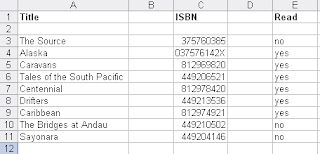
With Evernote 10, scripting is no longer available for Evernote, at least in Windows.  The application ENScript is no longer available.   I never used it much, but I enjoyed dinking around with in.  I had a little AutoIt script that could create individual notes for each line of a spreadsheet.  I wrote about it a couple of times, the most recently here . Evernote has been purchased by a new company. Their intent for future Evernote development is unclear. I don't know if scripting will be a part of it. I was reviewing the post mentioned above, and realized the ability to create notes from a spreadsheet could almost be done as well using Visual Basic for Applications in Excel.  A simple VBA app could generate a a text file and save it to your Evernote Upload directory. What wouldn't show up is a title and tags.   Instead of creating an entire script processing utility Evernote could allow simple markup to happen in the note. Something like <tit...

Scripting Evernote in Windows (an updated look)

Image
Below is a re-post of an entry from August 1, 2009.  My first ever re-post, but in my defense, still relevant. And I've updated it slightly. I am working on another project using Autoit and Evernote's Windows scripting engine, ENSCRIPT so have been looking at this script again, and fixing some broken links. So, onto the old post ... Evernote is one of those applications with a lot more power then is immediately evident. For example, Podcast #9   (June 2017 note - no longer available) debuted yesterday, and they talk about Saved Searches. As part of that, they talk about their rich search vocabulary and how they have hidden that ability in the API documentation . Another wonderful ability not obvious until you search around on their website, is Evernote's scripting capabilities. They have one for Windows they built called ENScript   ( June 2017 note: link updated)  , and another for the Macintosh   (June 2017 note: link updated) . Of course,...

Why I use Autoit 3 for many of my projects

Image
My next post appearing in a couple of minutes is a programming project I first did in 2009 about using Excel to create notes in Evernote. I wrote the tool in a scripting language called AutoIt .  Autoit is not generally thought of as a tool for developing applications.  I started to explain in the post why I chose Autoit, but the explanation was getting lengthy, so I decided to have just a brief statement in that post, and then link to a longer explanation. This post is that longer explanation, and also a recommendation of Autoit for certain users and tasks. Let's take a look at what is Autoit and why I chose it. Look for a future, far more ambitious project being done in Autoit coming in several weeks (to a couple months--you know programming projects!)

Scripting Evernote in Windows

Image
Note:  This post was updated in June 2017.   Please go to that post and ignore this one. Evernote is one of those applications with a lot more power then is immediately evident. For example, Podcast #9 debuted yesterday, and they talk about Saved Searches. As part of that, they talk about their rich search vocabulary and how they have hidden that ability in the API documentation . Another wonderful ability not obvious until you search around on their website, is Evernote's scripting capabilities. They have one for Windows they built called ENScript , and another for the Macintosh . Of course, they have their full fledged API as well, but for a hobbyist programmer like myself, the scripting was intriguing. I've been playing around with the scripting and thought I'd share an example script showing the kind of power it gives an Evernote user with just a little bit of programming ability. Before we all began using Evernote, we all had data in a variety of fi...